mirror of
https://github.com/Nezumi-2711/Foodify-Shipper.git
synced 2026-09-22 13:38:42 +00:00

429 lines
13 KiB
Markdown
429 lines
13 KiB
Markdown
# ListDialog Documentation
|
|
## Examples
|
|
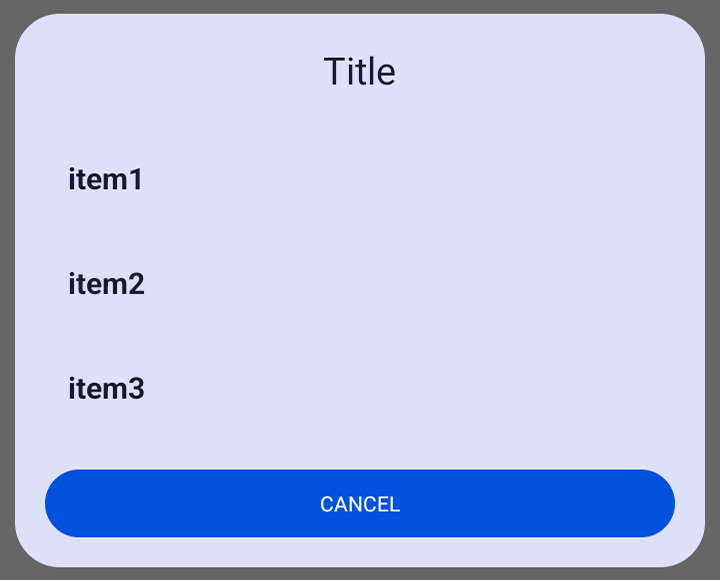
#### List of String array
|
|
```java
|
|
String[] strings = {"item1","item2","item3"};
|
|
|
|
ListDialog listDialog = new ListDialog();
|
|
listDialog.Builder(this)
|
|
.setItems(strings,(position, value) -> {
|
|
// Do something
|
|
})
|
|
.show();
|
|
```
|
|
|
|
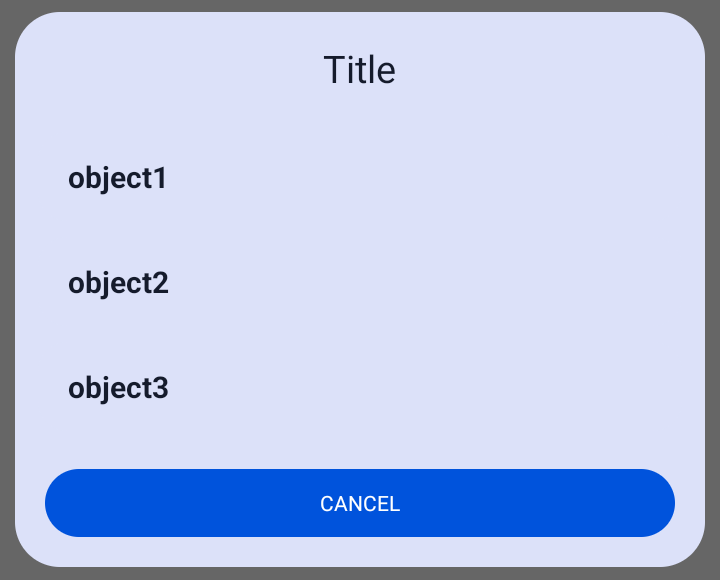
#### List of Objects
|
|
```java
|
|
class ExampleObject{
|
|
String value;
|
|
|
|
public ExampleObject(String value) {
|
|
this.value = value;
|
|
}
|
|
}
|
|
```
|
|
|
|
```java
|
|
ExampleObject[] objects = {new ExampleObject("object1"),new ExampleObject("object2"),new ExampleObject("object3")};
|
|
|
|
ListDialog listDialog = new ListDialog();
|
|
listDialog.Builder(this)
|
|
.setItems(
|
|
objects,
|
|
obj -> obj.value, // get value from object
|
|
(position, value) -> {
|
|
// Do something
|
|
})
|
|
.show();
|
|
```
|
|
|
|
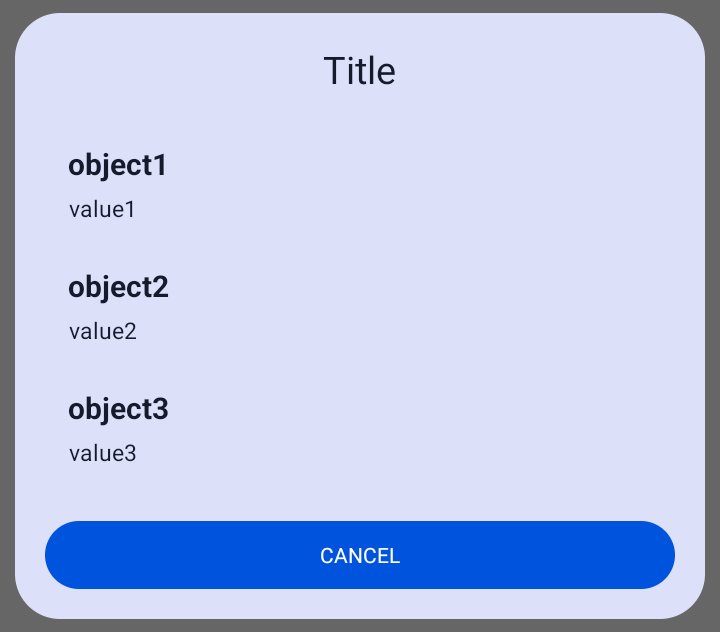
#### ArrayList of Objects with two values
|
|
```java
|
|
class ExampleObject{
|
|
String value1;
|
|
String value2;
|
|
|
|
public ExampleObject(String value1, String value2) {
|
|
this.value1 = value1;
|
|
this.value2 = value2;
|
|
}
|
|
}
|
|
```
|
|
```java
|
|
ArrayList<ExampleObject> arrayList = new ArrayList<>();
|
|
arrayList.add(new ExampleObject("object1","value1"));
|
|
arrayList.add(new ExampleObject("object2","value2"));
|
|
arrayList.add(new ExampleObject("object3","value3"));
|
|
|
|
ListDialog listDialog = new ListDialog();
|
|
listDialog.Builder(this)
|
|
.setItems(
|
|
arrayList,
|
|
new ListItemValues<ExampleObject>() {
|
|
@Override
|
|
public String getValue1(ExampleObject obj) {
|
|
return obj.value1;
|
|
}
|
|
|
|
@Override
|
|
public String getValue2(ExampleObject obj) {
|
|
return obj.value2;
|
|
}
|
|
},
|
|
(position, value) -> {
|
|
// Do something
|
|
})
|
|
.show();
|
|
```
|
|
|
|
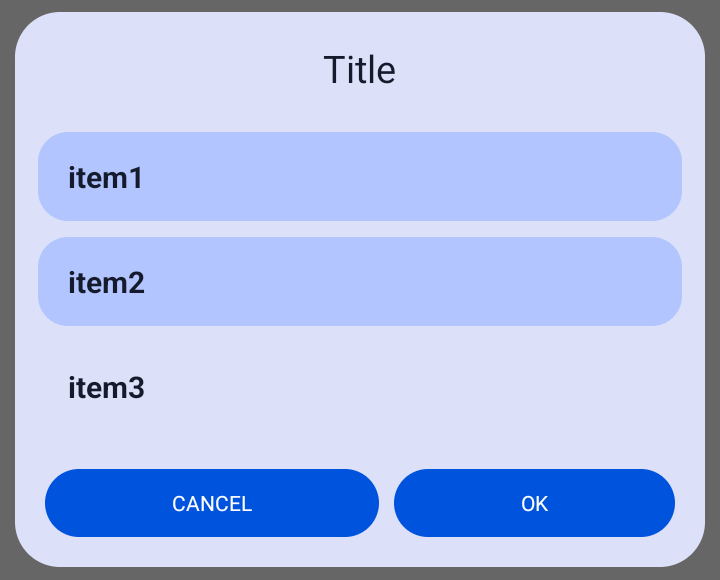
#### Selecting multiple items in a list
|
|
```java
|
|
ArrayList<String> stringArrayList = new ArrayList<>();
|
|
stringArrayList.add("item1");
|
|
stringArrayList.add("item2");
|
|
stringArrayList.add("item3");
|
|
|
|
ListDialog listDialog = new ListDialog();
|
|
listDialog.Builder(this)
|
|
.dialogWithTwoButtons()
|
|
.setSelectableList()
|
|
.setItems(stringArrayList,obj -> obj)
|
|
.onButtonClick(() -> {
|
|
ArrayList<ExampleObject> selectedItems = listDialog.getSelectedItems();
|
|
// Do something
|
|
})
|
|
.show();
|
|
```
|
|
|
|
## Builder
|
|
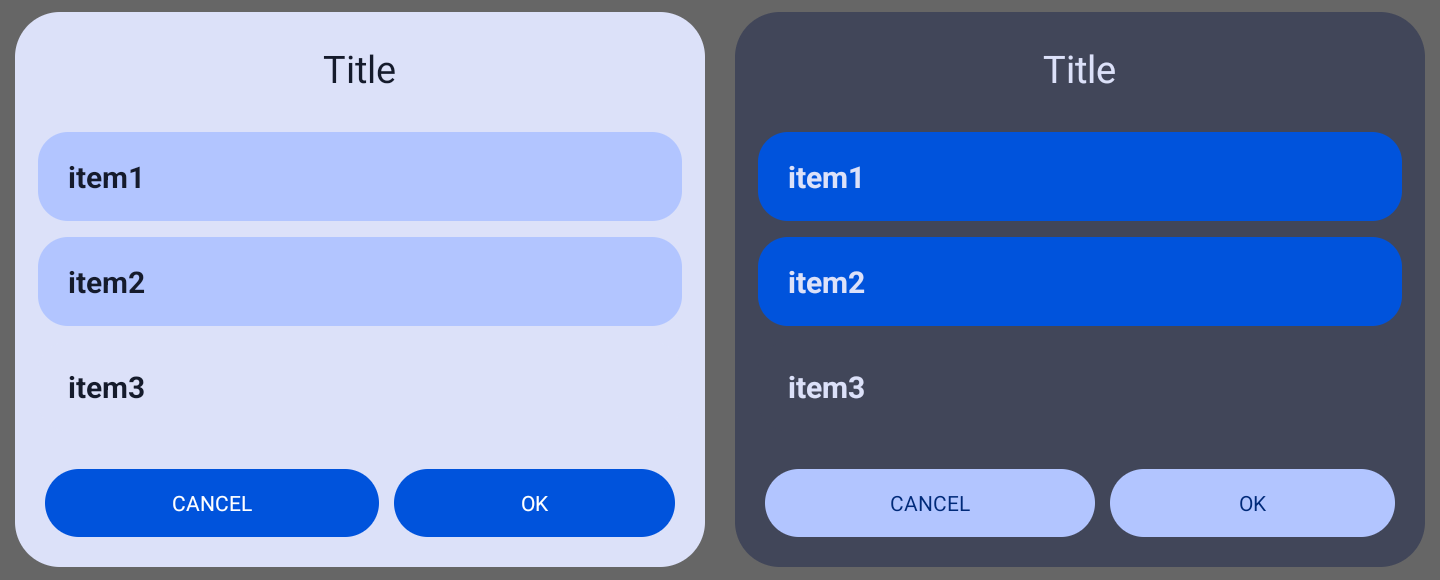
Apply the default theme to a dialog
|
|
```java
|
|
listDialog.Builder(context)
|
|
```
|
|
|
|
Apply the app theme to a dialog **(only works with material3 theme)**
|
|
```java
|
|
listDialog.Builder(context,true)
|
|
```
|
|
Apply the custom theme to a dialog **(only works with material3 theme)**
|
|
```java
|
|
listDialog.Builder(context,theme)
|
|
```
|
|
## Dialog with two buttons
|
|
```java
|
|
listDialog.dialogWithTwoButtons();
|
|
```
|
|
## Old Dialog theme
|
|
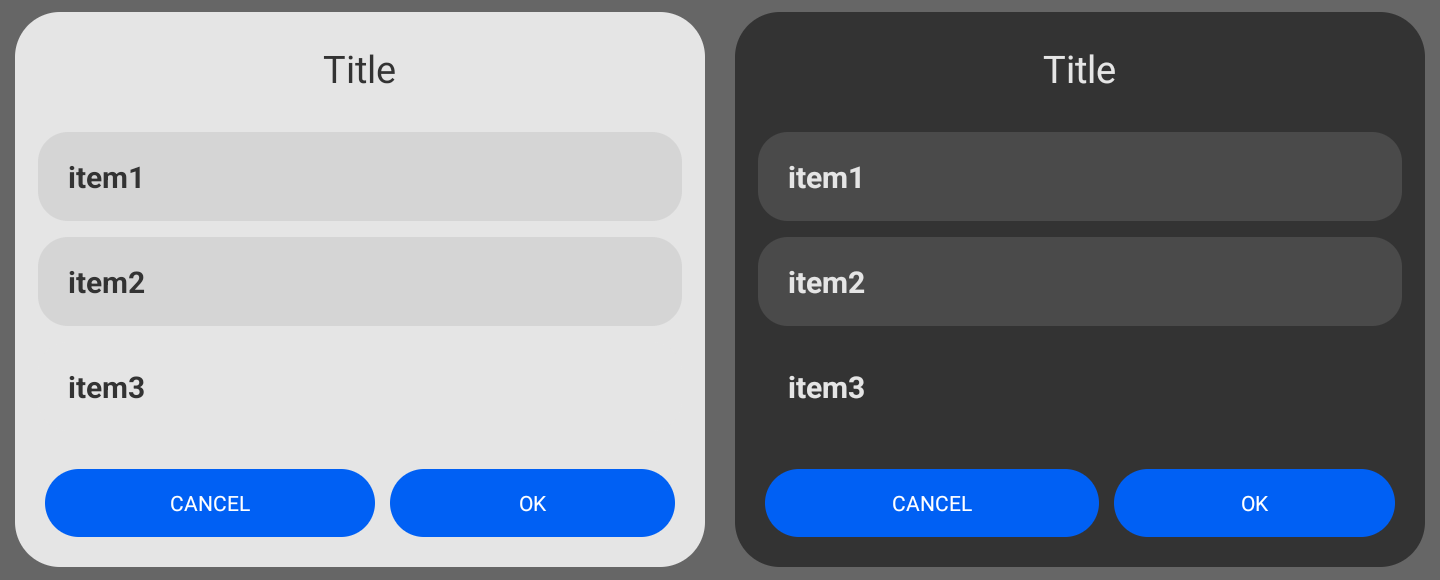
By default dialog colors will be set to material3 dynamic colors. With this method you can set the dialog color for the background and buttons to the older non-dynamic colors
|
|
```java
|
|
listDialog.setOldTheme();
|
|
```
|
|
|
|
## Select multiple items in a list
|
|
```java
|
|
listDialog.setSelectableList();
|
|
```
|
|
## Add items in a list
|
|
You can add item in a list by setting [ReciclerView Adapter](#set-reciclerview-adapter), using [setItems()](#setitems) method or using [setImageItems()](#setimageitems) method for list with icons.
|
|
### Set ReciclerView Adapter
|
|
```java
|
|
listDialog.setAdapter(recyclerViewAdapter);
|
|
```
|
|
### setItems
|
|
This method uses [DefaultListAdapter](/SJDialog/src/main/java/com/sjapps/library/customdialog/adapter/DefaultListAdapter.java) for array of Strings or [DefaultListAdapterGeneric](/SJDialog/src/main/java/com/sjapps/library/customdialog/adapter/DefaultListAdapterGeneric.java) for array of Objects or ArrayList.
|
|
|
|
#### Array of Strings
|
|
You need to use [setSelectableList()](#select-multiple-items-in-a-list) firstly or add [onListItemClick](#array-of-strings-and-onlistitemclick)
|
|
```java
|
|
listDialog.setItems(strings);
|
|
```
|
|
#### Array of Strings and onListItemClick
|
|
```java
|
|
listDialog.setItems(strings,(position, value) -> {
|
|
// Do something
|
|
});
|
|
```
|
|
#### Array of Objects
|
|
You need to use [setSelectableList()](#select-multiple-items-in-a-list) firstly or add [onListItemClick](#array-of-objects-and-onlistitemclick)
|
|
```java
|
|
listDialog.setItems(objects, new ListItemValue<ExampleObject>() {
|
|
@Override
|
|
public String getValue(ExampleObject obj) {
|
|
return obj.value; // get value of an Object
|
|
}
|
|
});
|
|
|
|
//or
|
|
|
|
listDialog.setItems(objects,obj -> obj.value);
|
|
```
|
|
#### Array of Objects and onListItemClick
|
|
```java
|
|
listDialog.setItems(objects,obj -> obj.value,(position, obj) -> {
|
|
// Do something
|
|
});
|
|
```
|
|
#### Array of Objects with two values
|
|
You need to use [setSelectableList()](#select-multiple-items-in-a-list) firstly or add [onListItemClick](#array-of-objects-with-two-values-and-onlistitemclick)
|
|
```java
|
|
listDialog.setItems(objects, new ListItemValues<ExampleObject>() {
|
|
@Override
|
|
public String getValue1(ExampleObject obj) {
|
|
return obj.value1;
|
|
}
|
|
|
|
@Override
|
|
public String getValue2(ExampleObject obj) {
|
|
return obj.value2;
|
|
}
|
|
});
|
|
```
|
|
#### Array of Objects with two values and onListItemClick
|
|
```java
|
|
listDialog.setItems(objects, new ListItemValues<ExampleObject>() {
|
|
@Override
|
|
public String getValue1(ExampleObject obj) {
|
|
return obj.value1;
|
|
}
|
|
|
|
@Override
|
|
public String getValue2(ExampleObject obj) {
|
|
return obj.value2;
|
|
}
|
|
},(position, obj) -> {
|
|
// Do something
|
|
});
|
|
```
|
|
#### ArrayList
|
|
You need to use [setSelectableList()](#select-multiple-items-in-a-list) firstly or add [onListItemClick](#arraylist-and-onlistitemclick)
|
|
```java
|
|
listDialog.setItems(arrayList,obj -> obj.value);
|
|
```
|
|
#### ArrayList and onListItemClick
|
|
```java
|
|
listDialog.setItems(arrayList,obj -> obj.value,(position, obj) -> {
|
|
// Do something
|
|
});
|
|
```
|
|
#### ArrayList with two values
|
|
You need to use [setSelectableList()](#select-multiple-items-in-a-list) firstly or add [onListItemClick](#arraylist-with-two-values-and-onlistitemclick)
|
|
```java
|
|
listDialog.setItems(arrayList, new ListItemValues<ExampleObject>() {
|
|
@Override
|
|
public String getValue1(ExampleObject obj) {
|
|
return obj.value1;
|
|
}
|
|
|
|
@Override
|
|
public String getValue2(ExampleObject obj) {
|
|
return obj.value2;
|
|
}
|
|
});
|
|
```
|
|
#### ArrayList with two values and onListItemClick
|
|
```java
|
|
listDialog.setItems(arrayList, new ListItemValues<ExampleObject>() {
|
|
@Override
|
|
public String getValue1(ExampleObject obj) {
|
|
return obj.value1;
|
|
}
|
|
|
|
@Override
|
|
public String getValue2(ExampleObject obj) {
|
|
return obj.value2;
|
|
}
|
|
},(position, obj) -> {
|
|
// Do something
|
|
});
|
|
```
|
|
### setImageItems
|
|
Creating ArrayList of [ImageListItem](/SJDialog/src/main/java/com/sjapps/library/customdialog/ImageListItem.java)
|
|
```java
|
|
ArrayList<ImageListItem> listItems = new ArrayList<>();
|
|
listItems.add(new ImageListItem("item1", drawable1));
|
|
// or adding data of type Object
|
|
listItems.add(new ImageListItem("item2", drawable2,data));
|
|
```
|
|
#### ArrayList of ImageListItem
|
|
You need to use [setSelectableList()](#select-multiple-items-in-a-list) firstly or add [onListItemClick](#arraylist-of-two-imagelistitem-and-onlistitemclick)
|
|
```java
|
|
listDialog.setImageItems(listItems);
|
|
```
|
|
#### ArrayList of ImageListItem and onListItemClick
|
|
```java
|
|
listDialog.setImageItems(listItems, (position, obj) -> {
|
|
// Do something
|
|
});
|
|
```
|
|
## Set RecyclerView LayoutManager
|
|
```java
|
|
listDialog.setLayoutManager(layoutManager);
|
|
```
|
|
|
|
## Add onClick Listener
|
|
onClickListener for the right button if the dialog has [two buttons](#dialog-with-two-buttons), the left button is for dismissing dialog. If the dialog has only one button, onClickListener will be set to that button.
|
|
```java
|
|
listDialog.onButtonClick(new DialogButtonEvent() {
|
|
@Override
|
|
public void onButtonClick() {
|
|
// Do something
|
|
}
|
|
});
|
|
|
|
//or
|
|
|
|
listDialog.onButtonClick(() -> {
|
|
// Do something
|
|
});
|
|
```
|
|
onClickListener for left and right button (only works when dialog has [two buttons](#dialog-with-two-buttons))
|
|
```java
|
|
listDialog.onButtonClick(new DialogButtonEvents() {
|
|
@Override
|
|
public void onLeftButtonClick() {
|
|
// Do something
|
|
}
|
|
@Override
|
|
public void onRightButtonClick() {
|
|
// Do something
|
|
}
|
|
});
|
|
```
|
|
## All ListDialog Methods
|
|
```java
|
|
//Create dialog
|
|
listDialog.Builder(context);
|
|
|
|
//Create dialog width two buttons
|
|
listDialog.dialogWithTwoButtons();
|
|
|
|
//Usin the old dialog theme
|
|
listDialog.setOldTheme();
|
|
|
|
//Set title
|
|
listDialog.setTitle("Title");
|
|
|
|
//Set message
|
|
listDialog.setMessage("Message");
|
|
|
|
//Set title text alignment
|
|
listDialog.setTitleAlignment(TextAlignment);
|
|
//Set message text alignment
|
|
listDialog.setMessageAlignment(TextAlignment);
|
|
|
|
//Set text color
|
|
listDialog.setTextColor(color);
|
|
//Set title text color
|
|
listDialog.setTitleTextColor(color);
|
|
//Set message text color
|
|
listDialog.setMessageTextColor(color);
|
|
|
|
//Set button text (one button dialog)
|
|
listDialog.setButtonText("Text");
|
|
//Set left button text
|
|
listDialog.setLeftButtonText("Text");
|
|
//Set right button text
|
|
listDialog.setRightButtonText("Text");
|
|
|
|
//Set buttons color
|
|
listDialog.setButtonsColor(color);
|
|
//Set button color (one button dialog)
|
|
listDialog.setButtonColor(color);
|
|
//Set left button color
|
|
listDialog.setLeftButtonColor(color);
|
|
//Set right button color
|
|
listDialog.setRightButtonColor(color);
|
|
|
|
//Set buttons text color
|
|
listDialog.setButtonsTextColor(color);
|
|
//Set text color a button (one button dialog)
|
|
listDialog.setButtonTextColor(color);
|
|
//Set text color for left button
|
|
listDialog.setLeftButtonTextColor(color);
|
|
//Set text color for right button
|
|
listDialog.setRightButtonTextColor(color);
|
|
|
|
//Set buttons background resource
|
|
listDialog.setButtonsBackgroundResource(drawable);
|
|
//Set button background resource (one button dialog)
|
|
listDialog.setButtonBackgroundResource(drawable);
|
|
//Set left button background resource
|
|
listDialog.setLeftButtonBackgroundResource(drawable);
|
|
//Set right button background resource
|
|
listDialog.setRightButtonBackgroundResource(drawable);
|
|
|
|
//Set dialog color
|
|
listDialog.setDialogBackgroundColor(color);
|
|
//Set dialog background resource
|
|
listDialog.setDialogBackgroundResource(drawable);
|
|
|
|
//Selecting multiple items in a list
|
|
listDialog.setSelectableList();
|
|
|
|
//Set text color of an items in a list
|
|
listDialog.setListItemTextColor(color);
|
|
//Set a background resource for items in a list
|
|
listDialog.setListItemBackgroundResource(drawable);
|
|
//Set a background resource for selected items in a list
|
|
listDialog.setListItemSelectedBackgroundResource(drawable);
|
|
//Set a background resource of a list
|
|
listDialog.setListBackgroundResource(drawable);
|
|
|
|
//Get list item background resource
|
|
int ItemBgRes = listDialog.getListItemBgRes();
|
|
//Get list item selected background resource
|
|
int ItemBgResSelected = listDialog.getListItemBgResSelected();
|
|
|
|
//set RecyclerView Adapter
|
|
listDialog.setAdapter(recyclerViewAdapter);
|
|
//Set Layout Manager
|
|
listDialog.setLayoutManager(layoutManager);
|
|
|
|
//Add items in a list
|
|
listDialog.setItems(strings);
|
|
listDialog.setItems(strings, listItemClick);
|
|
listDialog.setItems(objects, listItemValue);
|
|
listDialog.setItems(objects, listItemValue, listItemClickObj);
|
|
listDialog.setItems(objects, listItemValues);
|
|
listDialog.setItems(objects, listItemValues, listItemClickObj);
|
|
listDialog.setItems(arrayList, listItemValue);
|
|
listDialog.setItems(arrayList, listItemValue, listItemClickObj);
|
|
listDialog.setItems(arrayList, listItemValues);
|
|
listDialog.setItems(arrayList, listItemValues, listItemClickObj);
|
|
listDialog.setImageItems(listItems);
|
|
listDialog.setImageItems(listItems, listItemClickObj);
|
|
|
|
//Hide 'List is empty' text
|
|
listDialog.hideEmptyListText();
|
|
//Change empty list text
|
|
listDialog.setEmptyListText("text");
|
|
|
|
//Set maximum dialog width. Default is 600dp
|
|
listDialog.setMaxDialogWidth(width);
|
|
|
|
//Get maximum dialog width
|
|
int dialogWidth = listDialog.getMaxDialogWidth();
|
|
|
|
//Get left button
|
|
Button leftButton = listDialog.getLeftButton();
|
|
|
|
//Get right button
|
|
Button rightButton = listDialog.getRightButton();
|
|
|
|
//Set dialog animations
|
|
listDialog.setDialogAnimations(styleRes);
|
|
|
|
//Enable or disable swipe down to dismiss dialog.
|
|
//By default is set to true
|
|
dialog.swipeToDismiss(boolean);
|
|
|
|
//Set dialog onTouchListener.
|
|
//This method will overide swipe down to dismiss action
|
|
dialog.setOnTouchListener(onTouchListener);
|
|
|
|
//Shew dialog
|
|
listDialog.show();
|
|
//Dismiss dialog
|
|
listDialog.dismiss();
|
|
```
|